

Top Drone Simulators to Master Realistic Flight Skills
2026-07-31
Getting a feel for real flight without breaking a shiny new quadcopter—or worse, annoying the neighbors—used to be a pipe dream. Today’s drone simulators flip that script, offering physics so spot-on you’ll instinctively correct for gusts before ever stepping outside. Whether you’re chasing buttery cinematic pans or razor-sharp racing lines, the right virtual cockpit makes all the difference. As SRIZFLY proves, bridging stick time and sky time has never been more immersive. Let’s explore the top picks that truly sharpen your reflexes—not just your screen-watching stamina.
Why Simulator Stick Time Matters More Than You Think
Most people assume that reading manuals or watching tutorials is enough to build real skill, but stick time in a simulator flips that idea on its head. There’s a quiet kind of learning that only happens when your hands are on the controls—subtle corrections, split-second reactions, and the feel of the aircraft becoming an extension of your own instincts. You can’t get that from a textbook. It’s the difference between knowing about a stall and actually recovering from one when the nose drops without warning.
What’s often ignored is how stick time reshapes your decision-making under pressure. A simulator lets you fail without consequences, and that’s where the real growth hides. You might botch an approach ten times, but on the eleventh, your thumbs move before your brain catches up—and that’s not luck, it’s repetition doing its job. Pilots who lean heavily on sim hours tend to carry a calm competence into the cockpit because they’ve already wrestled with the unexpected a hundred times over.
Beyond the technical edge, there’s a confidence that comes from sheer time spent wrestling with the unpredictability of flight dynamics. It’s not flashy, and it’s rarely discussed in glossy brochures, but those extra hours on the stick build a foundation that pure knowledge can’t replicate. When the weather turns or a system fails, you aren’t just recalling a checklist—you’re drawing on a library of lived moments that guide your hands. That’s why the quiet hours in a sim are worth more than most pilots admit.
Physics Engines That Mimic Real-World Wind and Weather
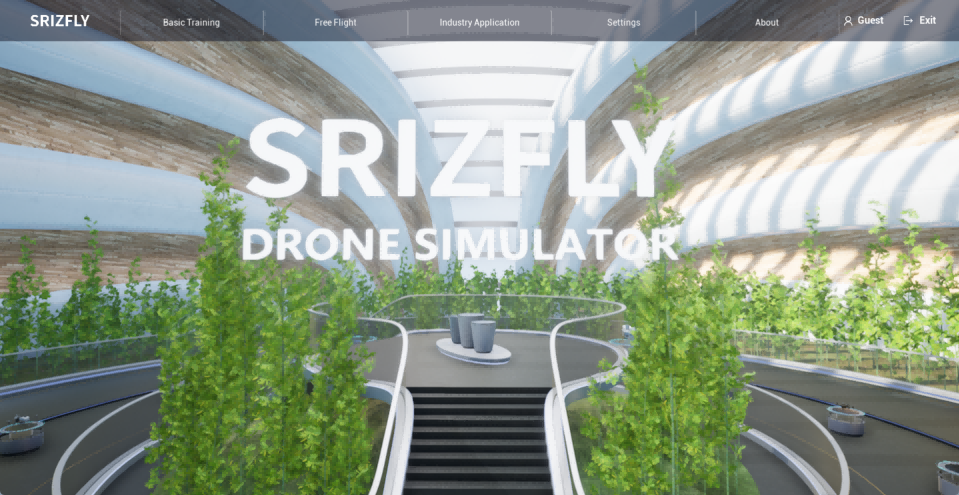
Modern simulations often demand more than prebaked animations; they need dynamic systems that react on the fly. Physics engines capable of mimicking real-world wind and weather achieve this by treating air and water as continuous fluids, solving simplified aerodynamic equations every frame. This allows virtual gusts to swirl around buildings or updrafts to lift dry leaves, with each object responding individually to localized pressure changes. The result is a scene that feels alive, where weather isn't just a backdrop but an active participant in the environment.
Under the hood, these engines blend coarse grid-based fluid solvers with particle methods to balance accuracy and performance. Wind fields are computed across the landscape, influenced by terrain and obstacles, then used to drive secondary effects like flag fluttering, cloth rippling, or dust devils forming spontaneously. Humidity and temperature gradients can trigger rain or fog that interacts with surfaces realistically—water droplets streak along windows, and puddles form where terrain dips. By modeling the smallest environmental interactions, developers avoid the uncanny stillness that breaks immersion, instead delivering worlds that breathe with chaotic, natural rhythm.
From Beginner Acro to Cinematic Mastery: Skill Progression in Simulators
Learning to throw a plane around the sky in a sim usually starts with the basics—coordinated turns, managing energy, and not stalling when you least expect it. You might spend hours just trying to hold a hover or nail a clean loop without drifting off heading. The beauty is, you can reset and try again instantly, building muscle memory without the real-world risk or cost. Over time, those jerky stick inputs smooth out, and you start linking moves together almost without thinking.
Moving from basic acro to something that feels truly cinematic means shifting focus from what the plane is doing to how it looks doing it. It's about understanding the rhythm of a sequence, where speed bleeds into a slow roll, or how light and perspective change during a knife-edge pass close to terrain. You learn to choreograph instead of just reacting, often using the sim's replay tools to critique your own lines like a director reviewing dailies. That feedback loop sharpens your eye for detail, until you can string together smooth, deliberate maneuvers that tell a story in the air—no cuts needed.
Hardware Integration: Getting the Most Out of Your Transmitter
Unlock the full potential of your transmitter by carefully matching it with complementary hardware. Start with the antenna—selecting the right type and gain for your environment prevents signal loss and extends reliable range. Next, pay attention to cabling: low-loss coaxial cables and properly crimped connectors reduce attenuation, ensuring your transmitted power reaches the airwaves intact. Even small details like mounting position and grounding can dramatically affect performance, so treat every physical connection as a critical link in the chain.
Power integration is another area where many setups fall short. Use a stable, noise-free supply that meets your transmitter’s peak current demands without voltage sag. Adding a good-quality power filter or conditioned source eliminates hum and interference that can degrade modulation quality. Additionally, integrating a robust cooling solution—whether passive heatsinks or forced airflow—keeps the transmitter operating within its thermal sweet spot, preserving longevity and maintaining consistent output.
Don’t overlook the control and monitoring interface. Seamless integration with microcontrollers, remote management panels, or software-defined workflows lets you adjust parameters on the fly and respond to changing conditions. By connecting your transmitter to a feedback loop—such as real-time SWR meters or temperature sensors—you gain proactive protection against faults. Thoughtful hardware integration isn’t just about making things work together; it’s about creating a cohesive system that outperforms the sum of its parts.
Community-Built Environments and Custom Challenges
The heart of any enduring game lies in its community, and here that connection runs deep. Players don't just explore pre-made worlds—they wield the same tools as the developers to sculpt their own. From sprawling cityscapes to intricate puzzle rooms, every creation carries a personal touch. The sharing system is seamless, letting you upload environments for others to experience with a single click. What sets this apart is how these community spaces organically evolve, incorporating feedback and spawning entirely new play styles never imagined by the original designers.
Custom challenges inject a fresh shot of adrenaline into the familiar. Imagine a timed obstacle course that demands pixel-perfect jumps, or a survival gauntlet where resources dwindle with each passing second. Creators can script complex rules, tweak physics, and even weave in narrative elements to turn a simple task into an epic saga. The best part? These aren't static missions—they often come with leaderboards and hidden secrets that keep you coming back. Watching a tight-knit group speedrun a devilishly difficult map is a spectacle that rivals any esport, yet it remains entirely grassroots.
The symbiosis between builders and players is where the magic truly happens. A creator might release a serene landscape, only to see the community repurpose it into a chaotic battle arena. This fluidity blurs the line between player and designer, fostering a culture of constant reinvention. With robust tagging and curation systems, you can easily find everything from meditative walks to endurance tests. The result is a living library of experiences that feels personal, surprising, and infinitely replayable—no two sessions are ever quite the same.
Data-Driven Feedback to Hone Every Maneuver
Every move you make leaves a trail of numbers waiting to be decoded. Instead of guessing what went wrong during a drill or relying on vague impressions, the system captures granular details—acceleration curves, angle precision, reaction gaps—and turns them into clear, actionable snapshots. It’s like having a coach who never blinks, pinpointing exactly where a maneuver begins to slip out of ideal form and why.
This feedback loop doesn’t just highlight errors; it reshapes practice itself. You get a breakdown that compares your current attempt against your own historical benchmarks, not some generic template. That means the advice is personal: maybe you need to adjust your weight transfer two-tenths of a second earlier, or perhaps your braking point consistently drifts when fatigue sets in. Small tweaks, repeated with data-backed reassurance, compound into fluid, reliable execution.
The real shift happens when you stop thinking about feedback as correction and start seeing it as conversation. Patterns emerge that you’d never notice in the moment—a subtle hesitation before a critical input, or a power drop-off that correlates with a specific mental state. By weaving these insights into daily sessions, you’re not just polishing isolated techniques. You’re rewiring the entire way your body and mind approach mastery, one maneuver at a time.
FAQ
It comes down to physics and feedback. A top-notch simulator models wind, gravity, and momentum exactly like a real quad would, and it lets you tweak rates and PID settings. Adding a decent radio controller tightens the loop—without it, even the prettiest graphics won't build muscle memory.
Velocidrone and Liftoff are the go-to picks. They both have beginner-friendly tutorials, adjustable difficulty, and huge community-made maps. Velocidrone leans more toward racing precision, while Liftoff feels a bit more forgiving and arcade-y, which helps new pilots stay motivated.
Not necessarily. Most modern sims scale pretty well, so even a laptop with a dedicated GPU from the last few years can handle medium settings. What matters more is a stable frame rate and low input lag—if it looks a little rough but reacts instantly, your training stays effective.
Absolutely, especially for acro mode and race gates. The simulator teaches your thumbs the subtle stick movements without risking a crash. The transition to real flying still has that adrenaline factor, but the control instincts you build in the sim translate almost 1:1.
Orqa FPV.Skydive is completely free and surprisingly good for basic acro practice. It’s lightweight and has multiplayer, though the scenery lacks polish. For a limited free taste, try the demo of DRL Simulator or Liftoff—they grant access to a couple of maps without payment.
Most modern radios just plug in via USB and show up as a game controller. You’ll need to calibrate the sticks inside the sim’s settings and map channels for throttle, yaw, pitch, and roll. A few older or cheaper transmitters might require a separate USB dongle, but they’re widely available.
Look for smooth yaw and pitch curves, a reliable inertia model, and environments with interesting obstacles like buildings or trees to fly around. Simulators that let you adjust camera angle and field of view help you frame shots. TRYP FPV and Uncrashed are popular for their large, detailed maps that inspire slow, fluid flying.
Yes, and it’s the single biggest reason to buy a simulator. Acro mode demands constant stick corrections that are completely unintuitive at first. Crashing in the sim costs nothing, so you can practice power loops, split-S turns, and flips until the movements become second nature before ever touching a real quad.
Conclusion
Mastering drone flight isn't just about logging airtime outdoors—simulators have become the unsung heroes of skill development, offering a risk-free environment where stick time truly shapes muscle memory. The physics engines in top-tier sims now replicate real-world wind gusts and turbulence with uncanny precision, forcing you to react to unpredictable weather without ever leaving the ground. Whether you're tentatively trying your first acro flip or chasing buttery-smooth cinematic orbits, the curated progression paths let you level up systematically. Plus, linking your own transmitter via USB or wireless dongle ensures that every input feels exactly like the real thing, bridging virtual and physical muscle memory seamlessly.
Beyond solo practice, these platforms thrive on community-built maps and custom challenges that push you far past generic tutorials—think tight warehouse gaps or alpine descents that users meticulously craft. Data-driven feedback overlays your performance after every session, highlighting throttle smoothness, line choice, and drift tendencies so you can zero in on weak spots. This blend of realistic physics, hardware integration, and peer-driven content transforms a simple simulator into a comprehensive training tool, letting you refine maneuvers until they become second nature before you ever risk a real drone.
Contact Us
Contact Person: Niles Liu
Email: [email protected]
Tel/WhatsApp: 8619945009803
Website: https://srizfly.com/